

Quick Tide Check
Kai is WaveTrader's new AI surf analyst, built right into the app. Ask about any crypto symbol and get instant, data-backed analysis: wave state, Break Signals, technical breakdowns, and the latest news. Kai is available now for Big Wave Pro subscribers.
Key Takeaways
- • Kai is a real-time AI analyst, not a generic chatbot. Every answer is grounded in live market data.
- • Four specialized tools: wave state analysis, break signal scanning, technical analysis, and crypto news
- • Fully transparent AI. You see exactly which tools Kai uses as it works.
- • Zero learning curve with one-tap suggestion prompts to get started instantly
- • Available now as an exclusive Big Wave Pro feature
What Is Kai?
Picture this: you're about to paddle out into the crypto markets, but you want a quick read on conditions first. That's Kai. It's your personal surf analyst who lives right inside WaveTrader, always watching the swells, always ready to break down what's happening and why.
Ask Kai anything about a crypto symbol. Want to know if BTC is riding an Up Swell or heading for a Down Crash? Curious about fresh Break Signals on ETH? Need the latest headlines before you paddle into a Paddle Zone? Kai pulls it all together in one natural conversation.
Here's the thing that sets Kai apart from every other AI chatbot out there: Kai doesn't make things up. Every answer comes from live market data, the same real-time sources that power WaveTrader's charts and signals. No hallucinations. No stale info. Just the real conditions on the water.
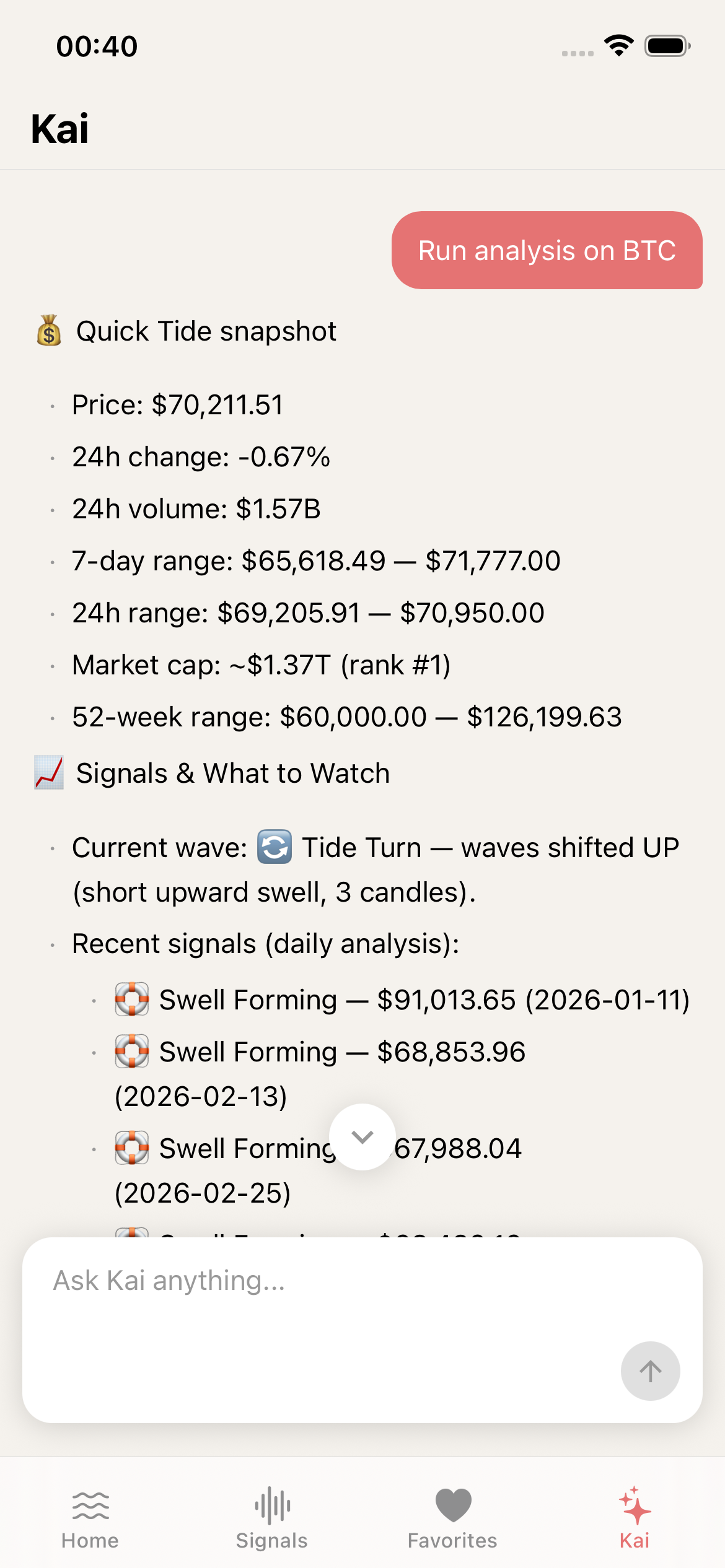
Kai running a live BTC analysis with price snapshot, wave state, and recent Break Signals
Four Tools, One Conversation
While you chat, Kai can call four specialized tools behind the scenes to back up every answer with real data. No switching screens, no hunting through dashboards. Kai brings the whole ocean to you.
| Tool | What It Does |
|---|---|
| Get Recent Signals | Scans recent trading patterns and Break Signals for any symbol |
| Get Wave State | Reads current wave formations like Up Swell, Down Crash, and Tide Turn |
| Search Crypto News | Pulls the latest cryptocurrency headlines relevant to your query |
| Run Analysis | Executes live technical analysis with price data, ranges, and market context |
Try asking "Analyze BTC" and watch what happens. Kai might call Run Analysis and Get Wave State together, giving you the full surf report on Bitcoin: price, volume, 7-day range, wave state, and recent Break Signals, all packed into one response.
How It Works
Paddling out with Kai takes about three seconds. Here's the flow:
Open the Kai tab
Tap the Kai icon in the bottom navigation bar. You'll see suggestion prompts ready to go.
Ask a question or tap a suggestion
Type your own question or pick one of the quick-start prompts: "Analyze BTC", "Give me news for BTC", "What wave patterns do you see on ETH?", or "Show me active patterns".
Watch Kai work in real time
Animated activity cards slide in showing which tools Kai is calling. Responses stream in live, so you're reading before Kai even finishes.
Continue the conversation
Ask follow-up questions, dive deeper into a specific signal, or switch to a different symbol. Kai keeps the context of your conversation.
Kai also remembers your current conversation across app restarts. After 2 days, old conversations wash away automatically, keeping the lineup clean and fresh.
Transparent AI You Can Trust
Most AI tools feel like a black box. You ask something, you get an answer, and you have zero idea where it came from. That's not how we roll at WaveTrader.
When Kai processes your request, animated activity cards pop up showing exactly which tool is running. A pulsing dot means Kai is still working, and a checkmark snaps in when each tool finishes. You always know what data Kai is pulling and where the surf report comes from.
This matters because good trading runs on trust. When Kai tells you Bitcoin is riding an Up Swell with a fresh Tide Turn signal, you can see that it actually ran the wave state analysis and scanned the recent Break Signals before giving you that read.
Getting Started with Kai
First time meeting Kai? Don't worry, you won't be staring at a blank screen. The moment you open the Kai tab, four quick-start suggestion cards are waiting for you:
"Analyze BTC"
"Give me news for BTC"
"What wave patterns do you see on ETH?"
"Show me active patterns"
One tap sends the prompt and Kai starts streaming the answer immediately. No setup, no configuration, no learning curve. Just tap and ride the wave.
Built for Mobile, Built for Speed
Kai isn't some web page crammed into an app shell. It's built natively for iOS with buttery 60fps animations, smart keyboard handling, and full dark/light mode support. Tables, lists, code blocks, and styled text all render beautifully on your phone.
Scrolled way up in a long conversation? A floating button pops up so you can jump back to Kai's latest response in one tap. Small detail, big difference when you're reading through a deep analysis session.
Under the Hood
For the surfers who like to wax their own boards, here's what powers Kai under the surface:
- • Streaming responses via Server-Sent Events for real-time output
- • Dual-layer authentication (API key + JWT) keeping your conversations secure
- • React Native Reanimated for buttery-smooth 60fps tool activity animations
- • Conversation persistence in local storage with automatic 2-day cleanup
- • Production error tracking with breadcrumbs on every stream lifecycle event
Availability & Pricing
Kai is an exclusive Big Wave Pro feature, the premium tier of WaveTrader. Here's how the tiers stack up:
| Tier | Name | Kai Access |
|---|---|---|
| Free | Free Surfer | ✕ |
| Standard | Wave Rider | ✕ |
| Premium | Big Wave Pro | ✓ Full Access |
Free and Standard users will see a "Meet Kai" screen with a quick preview of what Kai can do, plus a one-tap upgrade button that opens the subscription comparison directly with the Big Wave Pro tier pre-selected.
Your Surf Analyst Is Waiting
Kai isn't just another chatbot bolted onto a trading app. It's a purpose-built surf analyst that pulls live data, runs real technical analysis, and speaks WaveTrader. Every answer is transparent, every tool call is visible, and every response streams in real time.
Want to check if Bitcoin is in an Up Swell before your morning coffee? Need to scan the latest crypto headlines during lunch? Curious if ETH just triggered a fresh Break Signal? Kai's got you covered.
Download WaveTrader from the App Store and meet Kai today. The swell is building and the lineup is open.
Disclaimer: This article is for educational and informational purposes only. It does not constitute financial, investment, or trading advice. Cryptocurrency markets are volatile and carry significant risk. Past performance does not guarantee future results. Always do your own research and consider consulting a qualified financial advisor before making any investment decisions.